Showing posts with label technology. Show all posts

Thursday, July 21, 2011

Google Plus will change the web

Jason Hiner predicts that Google+ will change the web, here are some of his reasons.

Excerpt:

"Even with its rough edges and without the masses of humanity having access to Google+, the core experience is pretty powerful, and it’s easy to see where Google is going with this.

As I wrote over the weekend while diving into Google+, the most attractive part is how easy it is to find, add, and organize your friends (I cited that as the main reason you won’t hate Google+). The friend issue is the heart of all social networks, although it’s so obvious that it’s often overlooked. In fact, Twitter still isn’t very good at it, Facebook is a little better, but both of them now look like neophytes compared to the way Google+ does it.

The friend feature on Google+ is called “Circles,” and it turns out to be an intuitive mashup of friending (from Facebook) and following (from Twitter). Circles are basically sets of friends that you can drag and drop into groups, mirroring your existing social circles — Family & Friends, Colleagues, Local Techies, etc. — rather than just the one big lump of friends you have on Facebook that can result in moments of “worlds colliding,” since you have to share all of your updates with all of your friends. On Google+, you can selectively send updates to different circles, and you can quickly click between the news streams of your different circles.

You can also make circles for people you don’t necessarily know but are interested in following their updates (e.g. Tech Journalists, Famous Engineers, Web Celebrities, etc.). This is where Google+ echoes Twitter, because people don’t have to follow you back in order for you to add them to one of your Circles. At that point, you’ll see all of their public updates, and most of these folks make the majority of their updates public in order to be seen by more people (it’s the whole social media narcissism meme, and it has already transplanted itself on Google Plus).

The real killer feature to Circles in Google+ is how easy it is to find and add friends. Everywhere you see a user’s name or avatar you can simply mouse over it, click “Add to Circles,” and then select which circle to add them to. On Twitter, it took me about three years to find about 200 really interesting people (mostly in technology and the media) worth following. It took me less than three days to find that many on Google Plus. Of course, most of them are the same people, so Google+ has the advantage of speed by letting us quickly re-coagulate our existing social graph on the new service." 

I’m not predicting Google+ will replace Facebook and/or Twitter. This will definitely not be a zero sum game. Facebook has the most to lose from Google Plus, but it’s going to be years before Aunt Jenny and your plumber show up on Google+ the way they recently showed up on Facebook (and it’s possible they never will). All three of these social networks — Facebook, Google+, and Twitter — will still be going strong three years from now. People will gravitate to them for different reasons. They’ll go to Twitter for news and to cyber-stalk celebrities. They’ll go to Facebook for private networking, water cooler chats, and games." 

I have some friends who are test driving Google+ and they really like it. One said he liked it because when he goes to Google to search his social networking is right there in front of his face. I wouldn't like that, but hey everyone has different likes and dislikes. I'll definitely give Google+ a go just to try it out. I'm with Jason in that I don't think Google+ will replace Facebook or Twitter at all because none of the features are so outstanding that I want to delete my FB account and run to Google+. Some of things you can do in Google+ you can also do in FB. So, right now, there isn't anything Google+ is offering causing me to drool all over myself wanting it.
Read the rest of the post here. 

Thursday, June 2, 2011

Have you heard of Chrome OS?

Web applications are the future, whether techs like me like it or not (I like things I own to be somewhat tangible, e.g., I still like to have CDs and DVDs) and the good question is: Why not embrace the future? That's what Google is doing. Google is basing an operating system around their web browser. Cool, huh? I think so. The OS will boot up in an "instant-on" way like tablet PCs. All of the applications will not be installed locally on the computer, rather you'll have shortcuts for your applications (they'll be on the web). 

This concept is very interesting. I'm looking forward to seeing how it works in the field. Chrome OS is not out yet, however, I'll leave you with some links to check out.

This link will take you to a page with instructions on how to beta test Chrome OS and provide you with a link to download the beta version. Click here.

Click here to read more on Chrome OS and Chromebooks.

Wednesday, May 18, 2011

Do we really need Windows 8 so soon?

I've read that Microsoft is working speedily on Windows 8. I have to ask, why? With many users and businesses just now migrating to Windows 7 and many users and businesses still not migrating to Windows 7, it's hard to imagine why Microsoft would be working so feverishly on Windows 8 unless it's going to be a dramatic difference from Windows 7. Honestly, I don't see how 7 could be improved that much. Mark Kaelin recently wrote on this subject. 

Here is an excerpt:

"I am sensing a significant amount of upgrade fatigue, especially in small businesses. To overcome that reluctance to yet another upgrade to the Windows operating system, Microsoft will have to do something noteworthy with Windows 8 — something I have yet to see in any of the leaked photo galleries." 

I agree with Kaelin. Home users, yes, grow weary from operating system upgrades, however, businesses suffer from operating system upgrades. Most businesses are Windows based with their technology. When Microsoft releases a new operating system, the older Windows operating systems are tossed to the side when it comes to compatibility with new software, which hurts businesses. It's true that Microsoft will support the older OSes for a period of time with security updates, but businesses also need to know that their operating systems will be compatible with new software. 

When a business migrates all of its workstations, servers, etc. to a new operating system, there is significant cost. With Microsoft planning on releasing Windows 8 hot on Windows 7's heels, one wonders if, as Kalin said, Microsoft is playing with fire. In order for me to personally upgrade my system to 8, I'll have to be blown away by its features. I'm satisfied with 7. Businesses are satisfied with 7 too. With the economy in the state that it's in, it's hard to imagine any business going through another upgrade just to stay current.

What, 8, will you offer us? 

Related content

Is there a market for Windows 8 or is Microsoft playing with fire?

Monday, April 25, 2011

Which is better for employment: youth or experience?

Jason Hiner has been writing excellent posts lately. His latest post, Is youth or experience more valuable for working in IT, is very interesting. The article is not very long, but does raise a good question of whether youth or experience reigning supreme in the Information Technology field. Jason makes two points that don't seem to answer the question. 

1. Younger workers are cheaper, willing to work longer hours, and aren't settled specifically in one skill-set.
2. Older workers know how to get things done, been through multiple platform transitions, and can complete projects and "disasters" more efficiently due to experience. 

In point 1 Hiner says that younger workers are sought for those reasons, but then he goes on to say in point 2 that older workers are preferred for said reasons. So which is better? Youth or experience? Hiner left the question open for the reader to vote and give his/her reason for the vote. I voted experience because of the reasons that Hiner gave for older workers being preferred. I think youth will get you in the door for entry-level positions such as Help Desk, support technician, or network technician, but not higher end positions, e.g., network engineer. Lower end positions cater to youth because those positions don't need years of experience. Those positions, to me, seem to be made for training. 

A young man or woman could have the degree for a high-end position, but with no experience, their chances of getting the job are slim to none. If I were a hiring manager I would like to see experience and the degree on the applicant's resume for a high-end job. For a low-end job, a degree would be sufficient because the cost is minimal for a low-end job. 

Read Jason Hiner's article here.

Friday, April 22, 2011

Who should pass on Apple's iPad 2?

Jason Hiner, blogger and technology researcher for TechRepublic lists reasons why some should buy and why some shouldn't buy Apple's latest tablet the iPad 2.

Who should pass? The following is taken from his post.

  • Fans of iPad 1.0 - The worst reason for upgrading — and I’ve heard this a lot more than expected — is “I really like the original iPad so I’m going to get the new one.” If you’re not going to do much video calling and you’re not going to experiment with the iPad for creating videos and podcasts, then there’s really not much reason to upgrade from iPad 1 to iPad 2. You don’t really need the dual core if you’re not doing all the video calling and multimedia creation, and the slightly thinner/lighter form factor of the iPad 2 is nice but far from essential. The original iPad is still a great device and holding on to it for another year until the iPad 3 and the next generation of competitor tablets arrives could be a very wise choice.
  • Heavy readers - If one of the main reasons that you want an iPad is to use it as an e-reader then I wouldn’t recommend the iPad 2. For hard-core readers who read 2+ hours at a time, who read mostly books, or who spend a lot of time reading outside in full sunlight, then I’d recommend an Amazon Kindle instead. If you’re an omnivorous reader who wants a tablet primarily to read Web pages, magazine articles, non-fiction books with lots of maps and graphics, and PDF documents, then I’d simply recommend picking up an iPad 1, which lots of upgraders are currently unloading for as low as $300.
  • Supporters of open standards - Like the iPod before it, the iPad has appealed to a much wider audience than just traditional Mac and Apple fans. However, the thing to keep in mind before buying the iPad — especially if it’s your first Apple device — is that it will start to insidiously rope you into the Apple ecosystem. Sure, you can get content from outside the Apple ecosystem and use it on your iPad, using Amazon music and videos or Netflix or Barnes & Noble Nook, for example, but you’ll quickly find that it’s easier to just use the Apple ecosystem to buy content. Before you know it, you’ll have a small library of content with DRM that only works in iTunes and on Apple devices (this isn’t the case with music any more, but it is still the case with movies and TV shows). So, next time you upgrade you’ll be more likely to buy another Apple product so that you don’t orphan a bunch of your content. If you’re a supporter of open standards and use a lot of different platforms (e.g. Windows, Linux, Android, Xbox 360, etc.), then you’ll have a hard time wrestling with the iPad to make it work with all of your content and open file formats, and you’ll especially have a hard time getting content from the iPad to play nice with other platforms. You’re probably better off waiting for a really good Android tablet to emerge.
To read the full article click here. 

Tuesday, April 12, 2011

Firefox 4, Internet Explorer 9, and Chromium


If you've been on the web at all recently, whether you're using Firefox or Internet Explorer (IE), you've probably been prompted to upgrade your browser to the latest version. I say, go for it. I've tested both of the latest versions of Firefox and IE without any trouble at all from either upgrade. Both upgrades are quite substantial to the dominant browsers (IE 9 is so much better than IE 8).

Internet Explorer 9

This is what IE should have been a LONG time ago (I say the same thing about Windows 7). I'm not just talking about the browser's visuals when I say that; what I mean is performance. IE 9 does not suffer from the "walking through knee high mud" syndrome that it used to suffer from. Not that it was every incredibly slow, but it was slower than just about every other web browser available. Now, how has IE9 improved on performance? Let me tell you. 

Internet Explorer 9 boasts that its performance has increased by way of hardware acceleration. Even though the other mainstream browsers do not use this feature, it can improve your browsing experience. Microsoft gives the fish tank illustration. While playing Fish Tank in IE 9, you can have up to 1000 fish displaying on your screen without suffering from performance drought. Nice. 

Memory management is another nice feature of IE 9. Don't worry about having too many tabs open. When a tab is closed, IE 9 can rapidly release memory so performance isn't hindered. IE 9 will also notify you when add-ons are slowing browser performance; something Firefox 4 and Chrome do not have. 

For the full list of how IE 9 is "better" than its competitors click here. 

Firefox 4 

With the release of Firefox 4 Jason Hiner, a blogger for TechRepublic, was very excited. He felt that Firefox was in need of an improvement and he wanted to stick with the ol' Fox. However, after testing Firefox 4, he is now ready to move on to a different browser. I'll let him speak for himself. 

"After using Firefox 4 for less than a week, it’s clear to me that Mozilla hasn’t fixed the speed issues or the resource problems, and I’ve finally reached the point where I’m tired of fighting with Firefox. I’m tired of constantly looking at my open processes to see what’s bogging down my system and virtually every time it turns out to be Firefox.

The situation finally came to a head on Monday and Tuesday of this week when both cores of the CPU on my system were at 80% for big chunks of the day on both days, and the culprit was, naturally, my newly-installed Firefox 4. The clincher was when I took all of the tabs that I had open in Firefox (about 10 of them) and copied and pasted the URLs from Firefox into Chromium. Then, I closed down Firefox. The CPU utilization immediately dropped under 20% and everything on the system started running at normal speeds again." 

He then goes on to say:
"I had been using Firefox as my primary Web browser for six years. That’s certainly the longest I’ve ever stuck with a single browser — I was on Netscape and then IE for 3-4 years each before jumping to Firefox in late 2004. Still, I’m not going to be uninstalling Firefox. I’ll keep it around for occasional testing — especially for new TechRepublic features. But, I don’t see much chance of it regaining its spot as my primary Web browser."

Even after reading about his situation TR (TechRepublic) members chimed in, some agreeing and some disagreeing with Hiner's experience. My experience with Firefox 4 was not like Hiner's, but I didn't put the browser through extensive testing like he did. When I did open multiple tabs and use it in a work setting, I did notice Firefox being a resource hog. I put IE 9 through the same test and found out that IE 9 did not gorge itself on my system's resources like Firefox did. I was stunned. 
Don't let this stop you from trying or even using Firefox 4. I know this won't stop those that are true to the Fox, but for those of you on the fence, go ahead and give Firefox 4 a drive around the web. The visuals are updated, the ride is smooth, and there are some cool new features. Just don't be alarmed when you find that IE 9 runs leaner than the new Firefox. 

Read Jason Hiner's article on Firefox 4. 

Goodbye Firefox. Hello Chromium (not Google chrome).

The image I used came from: http://www.mahalo.com/deleting-browsing-history-in-internet-explorer-and-firefox/

Thursday, February 10, 2011

2011 cloud predictions and how the cloud affects IT pros

Cloud, cloud, cloud - the lingering doom hanging over us, the IT department, but is it such a bad thing? How is the cloud going to affect us? An article by Colin Smith at TechRepublic titled How will cloud computing change the IT pro's job in 2011 and beyond? has some answers for us.

"There is no question that cloud services are gaining momentum in many sectors. One of the interesting aspects of the uptake in cloud services is the number of small organizations that are moving to cloud services. Traditionally, IT innovations have seen early adopters in large organizations where economies of scale can help justify the initial cost of a new technology. Small organizations have typically been late adopters as they wait for the players to consolidate and technologies to become mainstream. Not so with cloud services. The fastest growing segment is small business.

It makes sense since cloud services give SMBs some of the economies of scale previously unattainable. Consider how much it would cost in hardware, software, backups, and human resources for a 15-user organization to implement Exchange, SharePoint, and Office Communicator, and Live Meeting in house. I don’t think it would be a stretch to suggest that it would cost at least $10K if not more over a three year period. My lowball costs are $5k in hardware, $2k in software, $1k in backups, and $2k in services. That works out to about $275 per month.

For the same 15 users, you could use Microsoft BPOS at a cost of $10 per user per month. That’s $150 per month. Of course there are less expensive options available from other vendors, but this is a direct comparison based on a brand new installation with no sunk costs.

The dramatic cost savings is the main appeal of small organizations that want to focus on their core competencies and minimize IT budgets."

Aha, cost savings. Yes, the cloud will decrease IT related expenditures greatly. OK, how does this affect the typical IT pro? Colin says it depends on the type of organization the pro works for.

"All organizations

The cloud provides flexibility and scalability not only to organizations but also to IT pros. With the ability to connect to cloud based services from more locations and devices, IT pros will find that they can do more remote work and the “office” will be wherever (and whenever) they can get a connection.

As cloud-based services homogenize the application landscape with fewer large players providing the majority of services, this will increase the mobility of IT pros, and the ramp up time associated with a move between employers will be shortened.

While this flexibility has some advantages like reduced commuting and real estate costs, it can also mean longer work hours that are not necessarily tracked or compensated.

Organizations that help employees achieve a healthy balance between work and other activities will see lower turnover. While also true in a non-cloud environment, the increase in employee mobility should be a concern for HR departments."

What I took from this section was "...longer work hours that are not necessarily tracked or compensated." I don't mind working over my regular 40 hours a week; I've done that many times, but within the cloud the extra hours worked will be hard to track because your availability will be anytime and anyplace. You'll be available anywhere there is a connection. The cloud has benefits, but so far the disadvantages are outweighing the advantages. Let's read on.

"Small organizations

Small organizations might find that they no longer need as many (or any) full time IT pros. IT might become a part-time role for somebody with another function and a proclivity for technology."

Less IT jobs it seems. In my experience, the employee with a proclivity for technology usually makes the technical problem worse; chalk up another negative for the cloud.

Small managed service providers

"The most immediate implication is for small outsourcing and managed service providers. The value-add that they provide is eroded significantly when compared with cloud services. As larger organizations providing cloud-based solutions attract more small business customers, small IT shops will lose customers, margin, and traditional service opportunities.

This is also an opportunity for those service providers that are agile enough to transform themselves into cloud partners. What I mean by this is that there are opportunities to help small businesses take advantage of cloud services and save money either through migration services or cloud service reselling. The sales pitch is easy but the margins are low. In order to have a viable business model, volume is key. This means that small managed service providers will need to grow their customer base significantly to maintain sustainability.

So what does this mean for the IT pro at a small outsourcing shop? I would expect that there will be far less hands-on technical work and much more menial administration across many more customers. There will also be an increase in network architecture and management requirements as connectivity to the cloud will increase in importance compared to local connectivity."

Say goodbye to your local computer support/sales shop. This is another negative of the cloud. Why? Because people, usually, like choose the local computer support shop for the better price of support and for the face-to-face interaction. This isn't a strong argument against the cloud, but it is one that hits home to many individuals and businesses. Also, so far, all I've noticed as benefits of the cloud are business benefits; where are the technical benefits of the cloud?

"Large organizations will see a splintering of their IT workforce. There will be a split between those who end up building and operating the internal private cloud and those who manage their organization’s use of cloud services (both private and public).

The private cloud team will build depth in the requisite technologies (e.g. virtualization, fabric computing, grid computing, etc.) for providing internal cloud services.

The team that manages the use of cloud services will have the more orthogonal shift in job description. They will have much less focus on operations. Their technical depth will decrease while more emphasis will be placed on technical breadth."

What about security? How secure will the cloud be? I don't think security is the goal here, but I do think money is. Cheaper cost is the mirage in desert of "expensive" technology. At least networks are secure right now! In my opinion, if you plunge your network into the cloud then the story down the road will be of someone's cloud being tapped for credit card numbers, social security numbers, etc. and find out that it has been happening for years. "The cloud" will not be so sexy anymore.

I know there are benefits to the cloud, but I can't help seeing that the only benefits are sales benefits which don't really matter when the situation is the security of customer and business data. How secure will that data be in the cloud? I'm thinking not very secure. I'll need to be convinced of this before I jump on the "Hey the cloud is so freaking cool" boat.

Read the full article by clicking here.

Thursday, January 27, 2011

Android App Creator 2.0 for Windows

[H/T] Techrepublic


From Techrepublic's description:

Android App Creator--build your own Android Apps. Droid Generator is the number one Android App Developer Tool on the market. You do not need to know how to program to create apps. Choose from multiple advanced layouts to create your app pages. Add images, links, and rich text, and even embed Web Code. The possibilities are endless. Did you know that the average app gets 100-500 downloads per day& Think of how much traffic you can direct to your blog or Web site? DroidGenerator lets you embed RSS Feeds, or your Twitter feed IN the app. Build your own android apps today.

It costs $39.00, but you'll be able to create your own app for your Android! Check it out.

You have to be a member of TechRepublic to download the App creator. Registration for TechRepublic is free and easy, so don't let that stop you from trying App Creator.

Download App Creator by clicking here.

Wednesday, December 8, 2010

Should you provide free IT consulting work?

At TechRepublic, I read an interesting blog post under the IT Consultant section that caught my eye: "Stop providing free IT consulting work." I thought about that for a second, read the post and then thought some more. I do IT work, sometimes, in addition to my full-time job and there have been times (very few) that I've done free work for people (mainly close friends). While I do agree with the main point of the article in regard to businesses, I think technicians that do consultant work on the side can offer a few free services. Let me explain.

The other day a friend of mine called me and asked me what this error message meant: "windows cannot start...blah blah." Well, I have worked on her computer before, so I was familiar with it, and I asked her the usual questions, "Have you installed any new hardware/software recently," so on and I found out she had Windows Updates set for automatic installation. From that, I knew that was the problem and I knew it would be a quick fix. So, I asked her to bring it to me (laptop) and I'll take care of it. It was fixed in less than 30 minutes. To me, that didn't warrant a fee because it was a babysit job and she was a friend.

If you're running a business that is your bread and butter, then no, free jobs shouldn't be given and customers shouldn't expect them. It doesn't make sense to give free services because then you would probably soon be unemployed. If you run an IT consultant business, I suggest you read the whole article because there are good tips for reducing free consulting. If you do IT work on the side for people, I think it's entirely OK to provide free services that are quick and easy to fix.

Here's an excerpt from the post:

People don’t call electricians and expect free step-by-step instruction regarding how to repair a failed ground or intermittent circuit. So why do they call IT consultants expecting such assistance? I wish I knew the answer to that question, because I can feel my blood pressure rising just recalling some of the requests clients, customers, and other callers have made.

Clients have asked my office to provide free telephone support for a wide variety of topics, which include:

  • Can’t you just walk me through this 17-step, 45-minute installation for free over the phone?
  • Just tell me the exact steps I need to follow to remove this Trojan infection.
  • Provide me with the 23 steps I need to follow to complete a complex, complicated task that requires expertise, experience, and proven knowledge to properly complete, but don’t bill me for it.
  • What do I need to click on or select when I get to that 14th screen, again?
  • I’m going to migrate all my old data myself, but what’s a .PST file, where do I find it, how do I reload it, and will it work with my new PC that doesn’t have office productivity installed?

These common calls increase stress and anxiety, but this madness doesn’t need to continue. While all IT consultancies should strive to assist clients, you must guard against providing service without compensation. If employees in my office lose just 15 minutes per day providing free support to callers, my office loses 625 hours (10 engineers times 15 minutes a day times 250 annual workdays) a year that would have otherwise been invested performing constructive tasks and assisting paying clients. That’s unacceptable and a disservice to those clients who do pay for the consultancy’ services.


Tuesday, October 5, 2010

Five (7) tips to ensure safe online purchases...


This is an article I read, over at TechRepublic, by a great blogger named Michael Kassner. He recently fell prey to conveinence over safety. The five tips he lists are very benefical, may seem like "common sense," but even the greatest of techies' fall short in their effort of shopping safe online. Here are the five tips Michael provides:

1: Use a credit card provider that offers one-time credit card numbers


This is where I got sloppy. I normally use a credit card provider that offers one-time numbers. But I was in a hurry and didn’t. What I gained at the moment was lost times 10 when I had to clean up my mess. Using my one-time credit card number would have removed any possibility of someone reusing the stolen information.

2: Make sure the Web site is valid and trustworthy


I recently wrote a piece on Blackhat SEO and how criminals are subverting real Web sites with malware or creating believable copies of real Web sites loaded with malware. I suggest using one or more of the site-rating Web-browser extensions. If the site is problematic, you will know.

Some of the better-known extensions are Web of Trust, LinkExtend, and McAfee SiteAdvisor. You also have the option to check questionable domains on the extension developer’s Web site.

3: Check to see whether the Internet connection is secure


This may seem obvious, but people get lulled into complacency. I have to remind myself to double-check that a closed padlock is displayed, that https is used, and that the certificate is valid — ideally, an EV certificate. Each Web browser uses a slightly different approach, so make sure you understand how your browser advertises secure Internet connections.

4: Beware of deceptive or disguised offers


Last year, I wrote an article about coupon-click fraud and how people were unknowingly signing up for programs or offers they did not want. When you’re filling out the information required to make an online purchase, carefully read what all the check boxes represent, regardless of whether they’re selected. Opt-in and opt-out wording may be interchanged.

5: If actively shopping on the Internet, check often for unusual debit/credit card transactions


This tip is important. In almost all cases, discovering fraudulent charges early will lessen the impact of the problem. In fact, financial institutions usually absorb the charges if they’re reported within a few days. So check often and know the liability limits used by your debit/credit card provider.

Extra tip: Call the order in if there is any doubtSounds simple enough, but many people don’t think of it. If I have any concerns at all, I will call the order in. The company may still have problems, but you don’t have to worry about its Web site being malicious or phishing for your financial information.

Another extra tip: Keep track of monthly or revolving debit/credit card chargesI now have a list of all my monthly charges, like the YMCA. I hope I won’t need it, but if my credit card information is compromised again, I will know who to contact.

Final thoughts: I got caught, giving convenience the nod over security. The above advice should prevent a reoccurrence. I hope l take it.

An extra tip I would add is to USE PAYPAL when shopping on eBay. Ebay is good about stressing the importance of using Paypal, I just thought I would mention it. Also, AVG utilizes the safe Web-extension serive in their
free anti-virus protection, so you don't have to purchase McAfee or others for that service. Make sure, when you're on websites that have you enter information, to check that you see "https" in the address bar at the top of the browser. The padlock is important to notice too.


For more resources on internet security click here.

Michael Kassner's blog posts and blog.

Friday, October 1, 2010

Free Microsoft Applications


Over at TechRepublic, I found an interesting article about free Microsoft applications. I was thinking I already knew all of the ones offered, but I was really surprised. Of the 10 mentioned, Worldwide Telescope looks the most interesting, though the others are cool too.

1: Paint.NET

Paint.NET started as a computer science project at Washington State University. But it was such a good image and photo-editing product (as well as an exceptional example of the .NET Framework technology in action), Microsoft hired the two developers, Rick Brewster and Tom Jackson, and has allowed them to continue improving the application and offering it as a free download. Paint.NET has a great user interface (Figure A), and it’s easy to use. It provides all the essential image-editing features you need, plus layers, special effects, and support for a wide range of image formats. Paint.NET also has quite a following on the Internet, and you can find lots of help, tutorials, and plug-ins — and it supports Windows 7!

2: Visual Web Developer 2008 Express Edition

If you’re a Web site developer at any level, you need to investigate Visual Web Developer 2008 Express Edition. This easy-to-learn, easy-to-use development environment makes it a snap for anyone to create Web sites or small applications. Mainly aimed at the amateur or intermediate-level developers, Visual Web Developer 2008 Express Edition provides professional-level features that will allow you to create a wide variety of Web sites, from the most basic HTML to more advanced ASP.NET pages or SQL Server databases. You can get started by viewing an introductory video that covers the main features of this package and walks you through some of the most common tasks.

3: XML Notepad 2007

If you need a basic, yet powerful XML editor, you’ll want to investigate XML Notepad 2007. The user interface features a tree view pane on the left that provides a color-coded view of classes, tags, and values. On the right, the main text editor pane shows all text, which is synchronized and color matched to its associated identifier on the left. You can even customize the colors and choose fonts to your liking. Other features include drag and drop, find and replace, incremental search, instant XML schema validation, a built-in XML Diff tool, and much more. You can learn more about the XML Notepad 2007 Design on MSDN.

4: Virtual PC 2007

Windows 7 supports Windows Virtual PC and Windows XP Mode. However, if you are running Windows Vista or Windows XP, you can still download and use the free Microsoft Virtual PC 2007 package, which will allow you to run multiple operating systems at the same time on the same physical computer. Virtual PC 2007 is easy to install and easy to use.

While you can install your own copies of Windows in Virtual PC 2007, at the time of this writing, Microsoft has several preconfigured VHDs (virtual hard drives) containing sample copies of Windows XP and Windows Vista that you can download and install in Virtual PC 2007 for testing purposes. You can find another Vista evaluation here.

5: WorldWide Telescope

The WorldWide Telescope from Microsoft Research offers a rich visualization environment that essentially provides you with a virtual telescope. This package brings together amazing imagery from the Hubble Space Telescope and approximately 10 earthbound telescopes. The images are stitched together seamlessly, allowing you to pan around outer space and zoom as far into any one area as the data will allow.

6: Windows SteadyState

If you support shared-access computers in a public venue, such as a classroom/lab, a library, or an Internet cafe, you’re definitely a prime candidate for Windows SteadyState. With this package, you can configure and lock down a Windows system to be just the way you want for your public setup. Users can do whatever they need to do, change whatever they want, or even inadvertently crash the system with malware while they’re using it. When they are done, you can reset the entire system to be exactly the way that it was the first day you configured it, just as if no one had used it. You can find several demos as well as an FAQ that will help you quickly determine if Windows SteadyState is the tool for your environment.

At the time of this writing, Windows SteadyState supports Windows XP and Windows Vista. Once Windows 7 is out the door, Microsoft should be adding it to the list of supported operating systems.

7: SyncToy 2.0

As its name implies, SyncToy is a synchronization tool designed to assist you in maintaining duplicate copies of files you might keep on a laptop and a desktop or on a desktop and a network drive. With the widespread availability of inexpensive external hard disks, SyncToy is also a great backup tool. SyncToy is intuitive, and it sports a straightforward user interface. In fact, the first time you use it, the opening screen prompts you to select a pair of folders you want to use, and then for simplicity, the folders are designated as the Left Folder and the Right Folder. There are five synchronization methods to choose from, but since there is no built-in scheduling capability, you must perform the operation manually. Even so, SyncToy 2.0 is extremely quick and efficient and is a great tool.

8: Office Accounting Express 2009

Office Accounting Express is an easy-to-use accounting package that has the familiar Microsoft Office interface and is designed to integrate seamlessly with other Office applications. Providing most accounting features a small business might need, such as managing credit cards, bank accounts, payroll, vendors, invoices, quotes, cash sales, and even built-in PayPal functionality, Office Accounting Express is a great piece of software for business managers.

9: SQL Server Express 2008

SQL Server Express 2008 is a slimmed-down version of SQL Server, yet it retains all the powerful SQL database features you need for building Web sites and apps. In fact, there are three versions: Express, Express with Tools, and Express with Advanced Services. It’s easy to learn and easy to use, and it provides the same advanced database engine as the full-fledged editions of SQL Server.

10: ServerQuest II game

OK, for the last of these Microsoft freebies, let’s take a look at something technologically entertaining. Do you remember playing the vintage computer games King’s Quest or Leisure Suit Larry? If so, you should enjoy Microsoft TechNet’s ServerQuest II game. It emulates the same sort of pixilated graphics (Figure C) and cheesy humor as those classics, but it’s aimed at IT professionals and computer specialists. In the game, which is created with Silverlight and runs in your browser, you play an IT pro (either Matt or Alicia) whose objective is to keep the network running smoothly while encountering a host of technical problems that are presented as games and puzzles, ranging from the absurd to things you might encounter in the real life of an IT pro. As you work through the tasks, you’ll learn about and use Microsoft technologies to solve problems, encounter hidden Easter Eggs, earn geek points, and get to post your high scores for others to compete against. The game is really very humorous — and you might even learn some interesting troubleshooting techniques as you play.


So which one sounds the most interesting to you? Do you know of any other free applications from Microsoft?

Monday, September 20, 2010

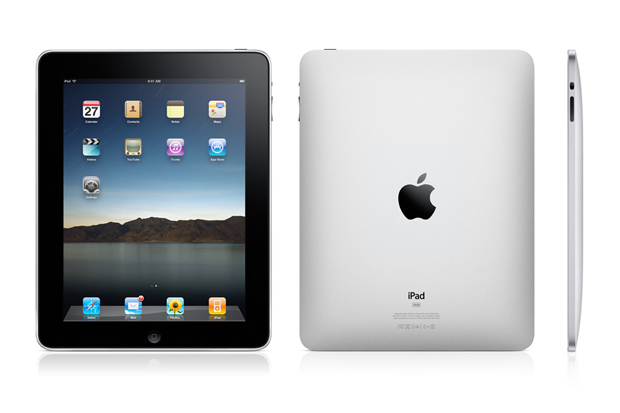
The iPad: A Review


It's actually a new device made by Apple (all the Apple fanboys start singing) and I have to admit that I, well, I like it. I tested one out recently and my expectations were reched. It's very cool, not revolutionary, but very cool in its execution and style. I'll lay it out for you.


Why do I like it?

Honestly, I didn't like the idea of it at first because I didn't understand Apple's target. I thought Apple was trying to attack the laptop industry, to a degree they still are, at the business level and try to replace laptops. Boy, I was wrong. I started researching and found out that Apple is finding the "in-between" device for consumers and some business users.

Seth, what do you mean by "in-between" device? I mean between laptop and smartphone. Now, if you want to go on a trip, you take your laptop along with your smartphone (if you have one). Yes, you can surf the web on your smartphone, but you can't get the full experience of the website, so you lug your laptop with you too. Taking your laptop is much better than your desktop, but hey, it can get in the way. Your answer is the iPad.

1. The size.

This baby is about the size of a tablet (hence, Pad is in the name) and weighs just a little bit more than a tablet. Very convenient.

2. OS

You know how when you want to check out a website really quick to make an annoying comment and you got to wait for your computer to load? Wouldn't it be cool if you had a device that was just as quick as your smartphone? Well, the iPad is here for you my friend. No load times at startup...very cool! It turns on very quick, like a phone, maybe even faster. It uses the iPhone's mobile operating system.

3. Sleek

Great design. Flashy. Some would say sexy, but I don't like using language like that for devices, it's just weird.

4. Great for content consumition users.

If you don't do a lot of "creating" on the web, the iPad could replace your desktop computer. If you don't post things (like blogging), create/maintain websites, or any other thing like that, and you just read well the iPad is for you my friend.

5. Speakers are great.

I listened to some music on the iPad and it sounded just as good as the speakers on my desktop. I have no complaints with the speakers.

What I Don't Like

1. No USB ports.

If I want to use some USB ports, then I have to attach a dongle, which eliminates the convenience of being a better portable device than the laptop. Apple, that was kind of stupid. Sorry, it's true. Why didn't you put some USB ports on this baby?

2. Flash?

No flash on this iPad? Ah, leaving some room open for Android to do that? Apple, why?

3. Virtual Keyboard

Of course, this is not a fair dislike, but I have to post it because it bothered me. I don't care for virtual keying so it will keep from wanting to buy one. However, like I said, you won't be making long posts with this device anyway, so it's not a strong argument, but for me it's a big deal.


Those are my only complaints because this is a device for the web surfing user that likes to do just that: lurk around on the web. You know, check out status updates on social networking sites, read some yahoo! articles, or read some posts on Reformed Seth; a content consumer, not doing anything flashy and this is the typical computer user. So, once there is an excellent Android release (Dell Streak? Please) then we can see the price war begin and I'll probably go with an Android device. I'm not saying the iPad isn't good, it's a great product, but I'm holding out for the competitor. I would like to have some USB ports on my tablet (for extra storage), and for flash.


What do I give the iPad? A 8/10. It's a good device. Go borrow your friend's iPad now and see what I'm talking about.
Some iPad videos here.

Thursday, August 19, 2010

Why there needs to be an Android tablet


The idea of the iPad is a marvelous idea. Yeah, at first I didn't care for the idea that much and I was against it. I publicly was against the iPad which can be seen over in the TR discussion threads, but why was I against the iPad? I had misunderstood the goal of the iPad. I had understood the goal of the iPad as a laptop killer. Given that description, one could easily see why I thought that was a horrible idea. The iPad couldn't possibly be a laptop killer at all. No physical keyboard, it's touch screen only, there are storage limitations, etc. You can read all of that in the forums at TR.

How the iPad Shines

The iPad is a great lightweight device for web browsing, sharing pictures like a porfolio, and for taking notes in a meeting. For those people that primarily use their computers as a consumption device, i.e., web browsing then the iPad is the perfect device for you. If you use a computer for content creation, i.e., creating documents, spreadsheets, emails, websites, or if you're a gamer then the iPad is definitely not for you.

Apple has hit the gold mine with this device. I would say that most computer users fall under the consumption label. The iPad can provide that service for quick information reading, email checking, listening to music, etc. Another great thing about is the quick startup of the iPad. When you turn it on, it's like turning on a smartphone because the iPad uses the mobile operating system used on the iPhone! Now that is another great feature of the iPad: no startup. If you want to look up something quick on the internet, no problem! You won't have to wait for your computer to startup if it's off, or wait for it to wakeup if it's asleep.

This is why there needs to be an Android tablet. Think about it. If the iPad is this good when it's the only guy in the competition, then the technology will grow with the arrival the competitor. Also, prices will drop with the addition of a competitor, which I think will be an Android based tablet. This is a very interesting time to be in technologically speaking, due to the level of growth we've seen over the past fifteen years in technology.
So, if there is an Android tablet, not only will that benefit technology, but it will also benefit the consumer with competive pricing, making these good lightweight devices available to more people. Right now, the iPad is around $500, which is a steep price for most people. However, if you're going to spend that much on a computer and the only thing you do is browse the web, then I would suggest purchasing an iPad. Or, you can wait for an Android based tablet to come on the scene. In my opinion, the prices will drop then.


Check out the iPad articles at TechRepublic

iPad website here

Monday, August 9, 2010

TechRepublic Questions of the Week


Are you having computer problems? Well, check out TechRepublic and their questions forum! There is almost always a question there that relates to whatever problem you may be having. TR (short for TechRepublic) has helped me a lot and it can help you too. There are plenty of IT professionals at TR (including me) that take the time to answer people's questions.


If you have "Googled" your problem and can't seem to find the answer, then post your question at TR and see if someone there can help you. Make sure and state your problem in detail, naming your Operating System (Windows XP, Vista, 7; Apple OS; or whatever Linux flavor you may be running), specs of your computer (as much as you know), and the actual error message you received (if any). The more information an IT pro' knows, the easier it is to help you. Also, make sure and state that you have searched your question online first before you just posted a question on TR; it will earn you a lot of respect because it shows that you at least tried to solve the problem on your own.


The Web is laced with answers to computer questions, but I understand that it is easier just to ask a question in a tech forum, especially if you don't know a whole lot about technology.


It's easy to become a member there and once you are a member, feel free to chime in on discussions and questions! There just might be a question posted that you could help out with.


Enjoy!

Tuesday, July 13, 2010

Windows XP still dominating the business world...


After all these years, Windows XP still dominates the business world. According to a recent article over at TechRepublic, 74% of work PCs still run XP, and they're roughly 4 years old. Now, to the average home-user that's probably shocking, if not jaw-dropping, but I don't find the news of XP dominating the business world to be shocking. In fact, it sounds just about right. XP is still a solid operating system for business (and home if you don't like eye-candy) use, it's ease-of-use functionality is very engaging to green bean users and average users alike.

Aside from the easy use of XP, wouldn't a business want to be using the latest technology? Well, that all depends. Windows XP is still compatible with today's software and Microsoft is still supporting Service Pack 3 for XP at the time of this writing so really one wouldn't be missing out on any new software. The only reason a company would need to update to Windows 7, and still not all of the workstations would need to upgrade, is if the company is a media-heavy/ art publishing company.


The main benefits of still using Windows XP


-A company can save money by staying with XP and choosing not to upgrade at the moment.

-XP is still compatible with legacy software (7's compatibility mode doesn't always work) that 7 can't run.

-Don't have to train users on Windows 7. This is a big benefit of staying with XP. Users, especially ones that don't like technology, don't like to take time out of their work-day to learn something new because often it's grueling and tiresome.

-Wait out the bugs.


I think those are the four main points for businesses staying with Windows XP right now. Migration to 7 or any new OS for that matter, just doesn't have many benefits to companies at this time. Many are probably thinking, "Well, Vista came and gone. XP still works." So, like I've thought, when it comes to business why fix something that isn't broke?